
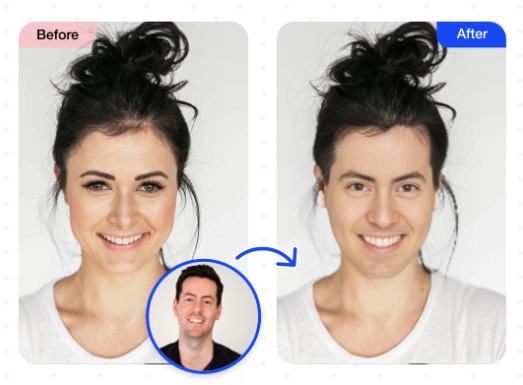
MioCreate Face Swap feature has already established itself as a powerful tool for creative expression, but for those looking to push the boundaries even further, some advanced techniques and strategies can take your face-swapping endeavors to new heights.
In this guide, we’ll explore some advanced tips and tricks for maximizing the potential of MioCreate Face Swap, allowing you to unleash your creativity with precision and finesse.
1. Mastering Facial Alignment
Achieving seamless face swaps requires precise alignment of facial features. Experiment with MioCreate alignment tools to ensure that eyes, noses, and mouths perfectly match the original and swapped faces. Pay attention to angles, proportions, and lighting to enhance the realism of your swaps.
2. Customizing Blend Modes
MioCreate offers a variety of blend modes that can enhance the blending of swapped faces with the original image or video. Experiment with different blend modes such as “Overlay,” “Multiply,” or “Soft Light” to achieve the desired level of integration and realism. Adjust opacity levels to fine-tune the blending effect for optimal results.
3. Refining Edge Detection
Fine-tuning edge detection is crucial for achieving clean and seamless face swaps. Use www.miocreate.com edge refinement tools to adjust the sensitivity and accuracy of edge detection, ensuring smooth transitions between the swapped and original faces. Pay attention to hairlines, facial contours, and clothing edges for a polished final result.
4. Experimenting with Expressions
Go beyond simple face swaps by experimenting with different facial expressions and emotions. Use MioCreate facial manipulation tools to adjust the expressions of swapped faces, adding laughter, surprise, or sadness to enhance the storytelling and emotional impact of your creations. Combine multiple facial expressions to create dynamic and expressive compositions.
5. Adding Depth and Dimension
Enhance the depth and dimension of your face swap by adjusting lighting and shadows. Experiment with MioCreate lighting effects and shadow adjustments to create realistic lighting conditions that match the environment of the original image or video. Adding subtle highlights and shadows can make swapped faces appear more lifelike and integrated.
6. Blending Multiple Faces
Explore the possibilities of blending multiple faces within a single composition. Experiment with MioCreate layering and masking tools to overlay multiple swapped faces onto a single image or video, creating surreal and imaginative compositions. Blend faces seamlessly to create intricate collages or montages that defy expectations.
7. Integrating with Other Effects
Combine face swapping with other effects and enhancements to create truly unique and captivating creations. Experiment with MioCreate filters, textures, and overlays to add depth, atmosphere, and style to your face swaps. Integrate special effects such as distortions, animations, or augmented reality elements to elevate your creations to new heights of creativity.
8. Collaborating and Sharing
Collaborate with other creators and share your advanced face swap creations with the world. Utilize MioCreate collaboration features to collaborate on projects, exchange ideas, and provide feedback. Share your creations on social media platforms, online communities, or digital art galleries to inspire others and showcase your creative prowess.
Conclusion
With these advanced tips and tricks, you can take your face-swapping endeavors to the next level and unlock a world of creative possibilities with MioCreate.
Experiment with precision, finesse, and imagination to create truly unique and captivating face-swap compositions that push the boundaries of visual storytelling and artistic expression. Embrace the challenge of mastering advanced techniques, and let your creativity soar with the MioCreate Face Swap feature.
