
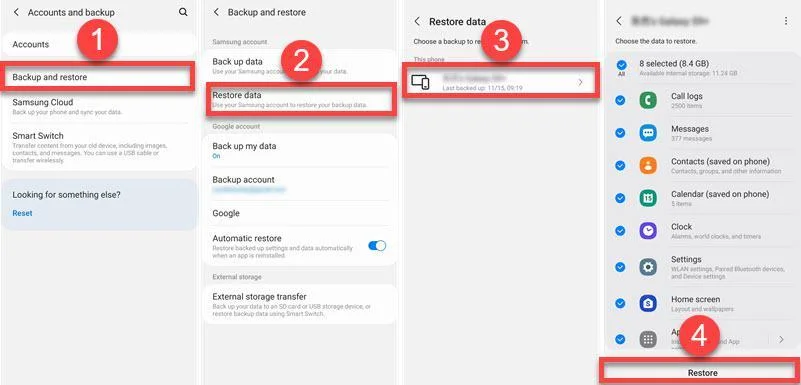
As a content creator Screen sometimes my job demands me to record explainer videos and steps to explain apps, settings, or small problems on my Android device. I do this for my blog and also to help people around me. One day, I recorded an important screen video that was around 15 minutes long. It showed step-by-step instructions on how to use the settings of an app’s premium version. After finishing the recording, I locked my phone and kept it aside. When I checked later, the screen recording file was missing.
When I Realized my Screen Recording was Missing!
At first, I thought the file had not saved properly. opened the Gallery app and searched for the video. I then checked the Screen Recordings folder using the File Manager. I also checked the Downloads folder and every other folder in the device. Then I restarted my phone once and checked again. Unfortunately, the file was not there. I knew I had recorded it properly, but I could not find it anywhere.
So I started searching online to understand what could have happened. I found that Android phones save screen recordings in different places. Some phones save them in Gallery. Some save them inside internal storage. A few phones even hide them inside system folders. This made things confusing for me because every guide was different. The conclusion was either it was hidden somewhere or deleted from the device.
Why Screen Recordings Disappear?
This never happened previously, but on digging deeper I realized that screen recordings can get deleted due to a system glitch or error, and sometimes storage cleaner apps remove them from the device. Also, System updates sometimes remove temporary files. So any of these could have happened on my phone. That is when I started looking for recovery options.
Before using any recovery tool, I tried some basic things. I connected the device to a Windows PC and searched for the video recordings in the file explorer. checked Google Photos to see if it was backed up. I also checked the Trash or Recently Deleted section in Gallery. Sadly, the recording was not there. At that point, I knew I needed help from a recovery tool.
The Search for a Safe Android Data Recovery Tool
When I searched for Android data recovery apps, I found many apps on the Play Store. Most of them promised free recovery. I tried two of them. One app showed too many ads and did nothing useful. Another app asked for strange permissions and slowed my phone. That made me uncomfortable. I removed both apps quickly. Many of these free recovery apps are not safe. Some apps are fake. Some apps only show ads. Others can harm your phone or steal data. Installing random apps during such times is not a good idea. I learned this after wasting time and risking my phone data.
After that experience, I decided to look for a trusted solution and came across Stellar Data Recovery For Android. I had heard about this name earlier on tech blogs and review sites. It looked more reliable because it works through a computer and not directly on the phone. So, I downloaded the software on my Windows laptop.
How I Recovered my Deleted Screen Recordings?
The installation was simple and did not take much time. The interface was clean and easy to understand, the first screen asks for what you want to recover like photos, videos, audio, documents, etc… There were clear options and no confusing terms, and so I connected my Android phone to the laptop using a USB cable.

The software asked me to enable USB debugging on my phone. I had never done this before. But the instructions were very clear. The steps were shown in simple language with screenshots, so I just followed them and enabled USB debugging without any issue.
Once the phone was connected, the scan started. The software scanned my phone storage and showed different file types. I could see photos, videos, and screen recordings listed. This gave me hope because it meant the deleted file was still there.

After the scan finished, I was able to preview the recovered files. I found my lost screen recording in the list. It had the same date and duration. I selected the file and clicked on recover. The file was saved on my computer. I played it immediately to check. The video worked fine and the audio was also clear. After recovering the file, I later copied it back to phone and also saved a backup on my laptop. The whole recovery process took some time, but it was smooth and simple and without errors.
What I Learned from the Recovery Process?
One thing I liked about Stellar Data Recovery For Android is it’s not confusing and made for people who are not tech experts. The steps are written clearly and the tool does not install anything unwanted on the phone.
While recovery tools cannot recover everything, if the files are overwritten or deleted long ago, Stellar Android data recovery tool managed to retrieve even some of my older files. Also, I did not delay and tried recovery soon after the file was deleted, I think this helped.
A Note for Readers
From now I always check if screen recordings are saved properly. I keep backups of important files and avoid using random cleaner apps. So, let’s come to the point, If your Android screen recording is deleted or missing, first, check all folders and trash options and then stop using the phone to avoid overwriting data. Don’t trust any random free data recovery tool, go for trusted brands and from my experience, Stellar Data Recovery For Android is a great option.
This tool helped me recover my deleted screen recording safely, and the reason I am sharing this story is – if you ever face the same challenge with your screen recordings, then you know what to do and how with the right steps, you can recover the screen recordings.
